
Bridging the Context Gap: ChatGPT Enters Chrome to Read and Synthesize Your Open Tabs

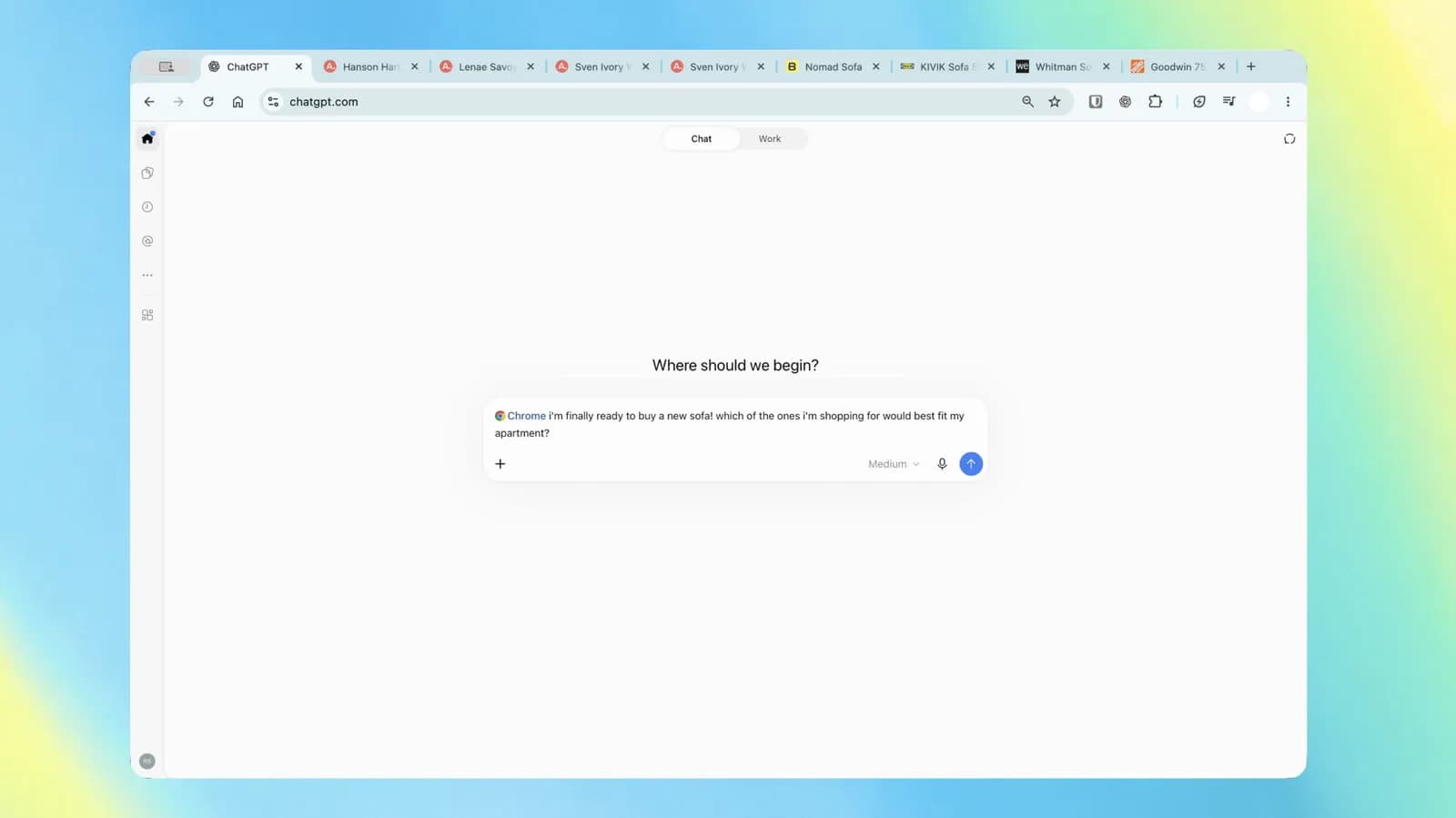
For years, using artificial intelligence to analyze web content has felt somewhat fragmented. Users typically find themselves trapped in an endless cycle of copying text from multiple browser tabs, pasting it into a separate chat window, refining their prompts, and toggling back and forth to verify details. Despite the massive leaps in large language model reasoning, the friction of manually feeding context into the model has remained an everyday bottleneck. OpenAI is now addressing this gap directly by allowing ChatGPT to inspect and interact with the content inside active Google Chrome tabs, bringing the assistant directly into the browser workflow.
By leveraging a dedicated browser extension capable of referencing open tabs, ChatGPT can now analyze disparate sources of information simultaneously. Whether comparing technical documentation across multiple repositories, synthesizing travel itineraries from competing booking portals, or cross-referencing code snippets from forums, the model is shifting from an isolated oracle into an in-situ workspace companion. This development represents a pivotal step in the evolution of conversational AI from passive response engines toward active, ambient digital assistants that understand the user's immediate visual and textual environment.
The Evolution of Browser-Integrated AI
Integrating artificial intelligence into web browsing is not entirely unprecedented, but the mechanism and depth of integration have changed dramatically over recent years. Initially, browser extensions offered basic wrapper functionality: highlighting a paragraph to rephrase it, asking a bot to summarize an article, or generating email replies directly within an input field. While helpful, these implementations operated strictly on isolated pieces of text or single web pages at a time, failing to capture the broader cognitive context of how people actually navigate the modern web.
In reality, knowledge workers rarely operate within a solitary tab. Deep research, technical troubleshooting, and market analysis typically involve dozens of simultaneously opened tabs containing conflicting perspectives, supplementary specifications, and fragmented datasets. By granting ChatGPT the architectural capability to read and compare data across these disparate tabs, OpenAI is moving the interaction model closer to how human users think: considering the entire workspace rather than a single webpage in isolation.
How Multi-Tab Context Works Under the Hood
From an engineering perspective, allowing an AI assistant to digest information across multiple open tabs requires balancing context window limitations, document object model (DOM) parsing, and real-time processing constraints. Modern web pages are notoriously noisy, laden with navigational menus, dynamic advertisements, trackers, and convoluted JavaScript structures that consume valuable tokens without offering semantic value.
To provide a coherent multi-tab experience, the underlying extension must extract readable text, sanitize the DOM into clean markdown or structured representations, and selectively route this information into the model's context window. The assistant must then perform cross-document attention, aligning matching entities, comparing conflicting figures, and drawing thematic conclusions across completely different web architectures. For developers and technical professionals, this architecture represents a significant upgrade over manual scraping or API-based web search, because it operates on authenticated session state—meaning the model can theoretically inspect pages behind logins, internal dashboards, and private documentation that public search engines cannot crawl.
Transforming Developer and Knowledge Workflows
For software developers, system administrators, and technical writers, the practical applications of multi-tab synthesis are vast. Troubleshooting complex errors frequently demands cross-referencing Stack Overflow threads, official language specifications, release notes for breaking changes, and GitHub issue trackers. Having an assistant that can simultaneously inspect all of these pages allows developers to ask composite questions such as identifying version mismatches or synthesizing migration guides tailored to their exact open dependencies.
Beyond engineering, competitive analysis and procurement workflows stand to gain immediate efficiency. Analysts evaluating SaaS pricing tiers, API rate limits, or vendor compliance requirements can open tabs for several competing platforms and instruct the AI to construct comparison tables summarizing differences in feature sets, pricing models, and security guarantees. By eliminating the manual chore of copy-pasting data points into spreadsheets, users can redirect their attention toward high-level strategic evaluation rather than tedious data gathering.
Privacy, Permissions, and Enterprise Security Risks
Despite the undeniable productivity advantages, granting a third-party AI extension permission to inspect active browser sessions introduces critical security and privacy considerations. A browser tab is one of the most sensitive operational environments on a computer, often displaying unredacted personally identifiable information, proprietary source code, financial records, and confidential corporate communications. Furthermore, because tabs often exist within authenticated corporate intranets, any tool with visibility into tab contents must be evaluated with extreme scrutiny.
- Data Leakage and Retention: Organizations need clear assurances regarding whether tab content sent to AI servers is stored, used to fine-tune future models, or retained in chat history logs that could be exposed via unauthorized access.
- Indirect Prompt Injection: If an extension reads external web pages to execute user commands, a malicious website containing hidden prompt injection instructions could attempt to hijack the model's behavior, potentially exfiltrating sensitive context from adjacent tabs.
- Credential and Token Exposure: Developers working with cloud consoles or internal developer portals often have sensitive environment variables or authorization headers exposed in DOM elements, requiring robust client-side sanitization before data is submitted upstream.
For enterprise IT administrators, these risks will undoubtedly prompt requests for fine-grained permissions controls, domain-level blacklisting, and rigorous zero-data-retention guarantees before wide-scale deployment is sanctioned within corporate environments.
The Broader Battle for the Browser Surface
OpenAI's latest browser capability highlights an accelerating conflict among tech titans for control over the primary desktop workspace: the browser. Google has been aggressively weaving Gemini into Chrome's native infrastructure, offering on-device intelligence and integrated sidebar assistance designed to keep users tethered to the Alphabet ecosystem. Similarly, Microsoft has embedded Copilot directly into Edge, positioning its browser as a comprehensive enterprise AI workstation integrated with Microsoft 365.
Meanwhile, AI research labs like Anthropic have experimented with "Computer Use" paradigms that allow models to interact with user interfaces via virtual screen capture and mouse clicks. By deploying a dedicated Chrome extension that orchestrates tab-level understanding, OpenAI is asserting its presence on rival territory—delivering agentic browser utilities directly to Chrome's dominant user base without requiring users to switch browsers or adopt entirely separate operating systems.
Looking Ahead: The Transition to Autonomous Web Agents
Tab-aware contextual assistance marks an important milestone, but it also hints at where browser-based artificial intelligence is inevitably heading: fully autonomous web agents. Reading, comparing, and summarizing open tabs is fundamentally an observational task; the logical next phase involves execution. Future iterations will likely move beyond passive analysis to take direct actions across those open tabs—such as filling out multi-step procurement forms, executing end-to-end user tests across web apps, or coordinating cloud deployments across different provider consoles.
As these models demonstrate greater reliability in parsing complex user interfaces and understanding human intent, the traditional distinction between browsing the web and interacting with an AI assistant will continue to blur. OpenAI's move to bridge the gap across Chrome tabs is not merely a convenience feature for multitasking power users; it is an early preview of an operating paradigm where software agents seamlessly navigate the web on our behalf.
Source: engadget.com